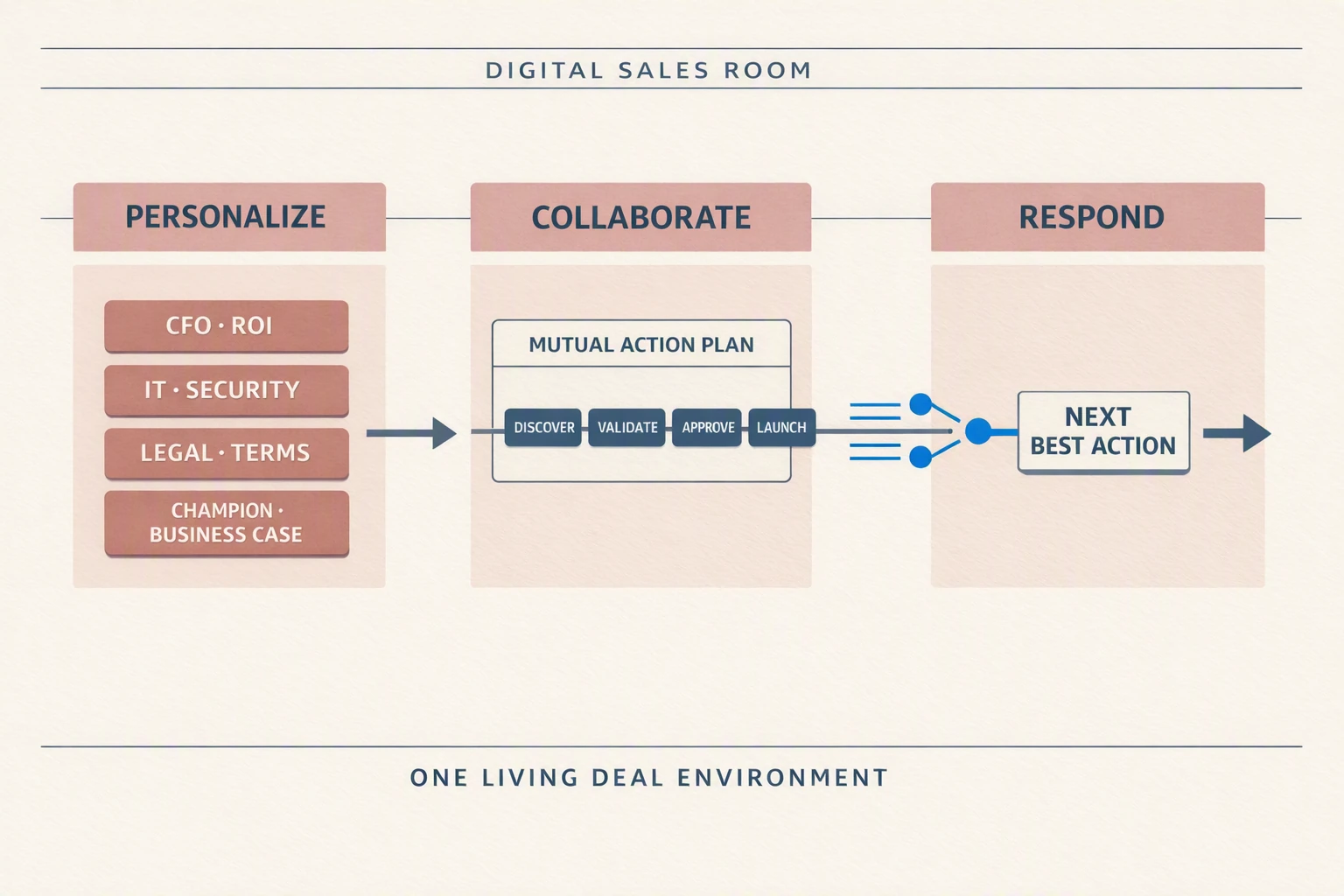
A digital sales room (DSR) is a secure, branded web page a seller shares with a buying team for one deal. It holds the current version of every asset, a mutual action plan with owners and dates on both sides, and a place for questions, and it shows the seller which stakeholders engaged with which content.
This guide covers how digital sales rooms compare with email attachments and slide decks, what the evidence says about close rates, what to put in a room at each deal stage, how to run a mutual action plan inside it, how to read engagement analytics without over-reading them, how AEs adopt rooms, and how to evaluate DSR software.
Last updated: 16 October 2026
Disclosure: Revspire publishes this guide and sells a digital sales room product. Every statistic below comes from a named third party, linked where it appears. None of the figures come from Revspire customers or the Revspire platform.
What is a digital sales room?
A digital sales room is a single, buyer-facing workspace for one opportunity. Instead of sending a deck, a proposal, a security pack and a pricing sheet as separate attachments across a dozen emails, the seller puts them on one page and sends one link. The buying team returns to that link throughout the deal, and the seller updates it as the deal moves. For a short definition and related terms, see the digital sales room glossary entry.
You will see the same idea under other names: deal room, sales room, buyer portal, deal microsite or mutual action workspace. “DSR” is the abbreviation most analysts and vendors use.
How does a digital sales room work?
Here is an illustrative example (not a customer case) of how a room works in an enterprise software deal:
- After discovery, the account executive creates a room from the CRM opportunity using a team template.
- The AE adds a short recap of what the buyer said, two or three relevant proof points, and a draft mutual action plan.
- The champion opens the room, corrects the priorities and forwards the link to a finance lead and an IT architect.
- The seller sees that finance opened the pricing page twice but nobody from IT has looked at the integration documents, and asks the champion for an introduction to the architect.
- As the deal moves to security review, procurement and legal, the seller adds the questionnaire responses, order form and contract, and both sides tick off plan tasks.
- At signature, the room becomes the handoff record for the onboarding team.
How is a digital sales room different from a sales enablement platform?
A sales enablement platform is seller-facing and spans every deal: it holds the approved content, playbooks and training sellers draw on. A digital sales room is buyer-facing and covers one deal. Many enablement platforms now include a DSR, so the content in a room can come straight from the governed library.
Why are B2B teams moving deals into digital sales rooms?
Three findings from analyst research explain why sellers have moved buyer-facing work out of email.
Buying decisions involve many people who are rarely in the same meeting. Forrester’s State of Business Buying 2024 (4 December 2024) reports that 13 people inside an organization are involved in the average buying decision, that 89% of purchases involve two or more departments, and that 86% of B2B purchases stall during the buying process. A different survey counts a smaller core group: TrustRadius and Pavilion found that 96% of buying groups have five or fewer members (2,164 technology buyers, reported by MarTech Series, 2024). The two figures probably measure different things: a small core team decides, while legal, security, procurement and finance each touch the deal. Either way, most of the people who decide never attend your demo, so your material has to make sense without you.
Buyers want to do more of the work on their own. In a Gartner survey published 9 March 2026, 67% of 646 B2B buyers said they prefer a rep-free experience, and 45% said they used AI during a recent purchase. A room gives those buyers a place to self-serve on the seller’s material, on their own schedule.
Helpful information makes buying easier. Gartner’s Customer Confidence research page (undated, accessed 16 October 2026) reports that buyers who receive helpful information show a 2.8x change in the likelihood of an easy purchase and a 3x change in the likelihood of a high-value, low-regret deal. Gartner does not state the sample size on that page.
Analysts expect the shift to continue. Gartner’s 2025 Market Guide for Digital Sales Rooms, as quoted in a SalesHood press release dated 14 March 2025, predicts that by 2028, 30% of all B2B sales cycles will be primarily run through a DSR. An earlier forecast that put the 30% mark at 2026, which Flowla attributes to a 2022 Gartner Innovation Insight report, still circulates; the 2028 wording is the more recent one we could verify. A Gartner case study published 2 May 2025 says chief sales officers can deploy rooms early in the sales process to streamline discovery and build buying-group consensus.
Digital sales room vs email, attachments and slide decks
The practical comparison is between three ways of getting material to a buying team. Each has a place.
| Question | Email with attachments | Slide deck | Digital sales room |
|---|---|---|---|
| Is the buyer looking at the latest version? | Not reliably. Every attachment is a copy, and old ones keep circulating. | Not after it is sent. Pricing, figures and case studies go stale in the copy. | Yes, if the room links to a maintained source. Updating the source updates what buyers see. |
| Does it work for people who missed the meeting? | Poorly. Forwarded threads lose context. | Poorly. Most decks are written to be presented, not read. | Better. A recap and role-specific sections explain the deal without the seller. |
| What does the seller learn after sending? | Opens and clicks at best. | Nothing, once it leaves the meeting. | Which stakeholders viewed which content and when, with the limits described below. |
| Where do next steps live? | Buried in threads. | On a “next steps” slide nobody updates. | In a shared mutual action plan with owners and dates. |
| Can access be controlled? | No, once sent. | No, once sent. | Usually: permissions, revocation, expiry and download controls vary by vendor. |
| Effort for the buyer | Low, until they need to find the latest file. | Low. | One more link. Low only if it opens without forcing account creation. |
| Best fit | Simple deals, one decision-maker, quick answers. | Live presentations and executive narratives. | Multi-stakeholder deals over several weeks with security, legal and procurement steps. |
Is the sales deck dead?
No. A deck is still the best format for a live presentation to an executive audience. What fails is the deck as a leave-behind: a long file forwarded to a CFO who was not in the room, with last quarter’s pricing buried in the middle. Present the deck live, then put it in the room next to a one-page summary written for people who were not there.
Is a digital sales room better than sending PDFs by email?
For a single decision-maker and a short cycle, email is fine and adds no friction. Once three or more functions need different material, or the deal runs longer than a few weeks, a room fixes the problems email cannot: version drift, lost context and next steps nobody can find. Email stays useful as the notification channel that points people back to the room.
Do digital sales rooms improve close rates?
We found no independent study with a control group that measures the effect of digital sales rooms on close rates, as of October 2026. Revspire’s digital sales room statistics page documents that search and grades the evidence that does exist. What is available is vendor platform data showing that buyer engagement and multithreading go with winning:
- Proposify’s State of Proposals 2026, based on 742,137 proposals sent through its platform in 2025, found buyers spent an average of 25.3 minutes viewing winning proposals against 15.8 minutes for losing ones. Winning proposals averaged 12 views against 8, and close rates rose 20% when more than one stakeholder viewed a proposal.
- Gong’s multi-threading guide (undated, accessed 16 October 2026) reports that closed-won deals include 67% more contacts than closed-lost deals, based on an analysis of “millions of sales interactions”.
- Outreach reported in a 19 February 2024 blog post that deals where AEs engaged buyers with a mutual action plan had a 26% higher win rate than deals without one. The post does not describe the method or dataset.
The same body of data contains a warning. Flowla’s State of Digital Sales Rooms research (17 February 2026, updated 2 April 2026) says its own research found that about 48% of deal rooms created never get any engagement. The article does not say which dataset that figure comes from; its separate analysis of room behaviour covers more than 30,000 rooms created in Flowla.
The fair reading: deals with engaged, multithreaded buying teams win more often, and a room makes that engagement easier to create and to see. That is correlation, not proof that a room causes wins; serious buyers engage more because they are serious. A room nobody opens changes nothing. If you want to know whether rooms help your team, compare deals with and without a room inside the same segment, deal size band and starting stage over one or two quarters, and look at stage conversion, cycle time and the share of deals lost to no decision.
What to put in a digital sales room at each deal stage
The most common mistake is loading every asset on day one. A room should show what this buying team needs for its next decision, and grow as the deal does.
| Deal stage | The room’s job | What to put in | Buyer action that shows progress |
|---|---|---|---|
| After discovery | Confirm the problem and agree how to evaluate | Written or short video recap of what you heard; draft success criteria; two or three proof points from the buyer’s industry; draft mutual action plan | Champion corrects the recap or adds priorities; invites a colleague |
| Evaluation and demo | Help each role evaluate on its own terms | Demo recording split into chapters; one section per role: business case inputs for finance, architecture and integration documents for IT, workflow walkthroughs for end users | New stakeholders open their section; questions arrive in the room |
| Business case and proposal | Equip the champion to sell internally | One-page business case the champion can forward; proposal with pricing options; references or case studies matched to industry and size; implementation outline | Finance views pricing; the economic buyer opens the business case |
| Security, legal and procurement | Remove paper-process friction | Security questionnaire answers and trust documents; data processing agreement; contract and redlines; order form; vendor onboarding forms; e-signature | Plan tasks for review and approval close on time |
| Close and handoff | Carry context into onboarding | Signed documents; kickoff plan; 30/60/90-day success milestones; named onboarding contacts; notes on what was promised | Kickoff booked; the customer’s project team joins the room |
Designing a room for multi-stakeholder deals
- Start with a stakeholder map. List each person, their role in the decision and what they need to say yes. Build sections for roles, not for your product’s features.
- Write for the person who was not in the meeting. Every section should open with two or three sentences that explain why it matters to that role.
- Keep it short. A welcome note, the recap, the plan, and one section per role is enough for most deals. Move superseded material to an archive tab rather than deleting it.
- Put the hard documents in early. Security and legal reviews are where deals wait. Sharing the security pack in the evaluation stage lets that review start in parallel.
How to run a mutual action plan inside a digital sales room
A mutual action plan (MAP) is a dated list of the steps both companies must complete to reach a decision and go live. Inside a room, it becomes the shared timeline every stakeholder can see, rather than a seller’s private checklist.
A useful MAP includes:
- The buyer’s target go-live date and the business event behind it, such as a contract renewal, a budget cycle or a regulatory deadline.
- Milestones worked backwards from that date: evaluation complete, business case approved, security review, legal review, procurement, signature, kickoff.
- An owner for every task, with buyer-side owners named, not just “customer”.
- Dependencies, for example that legal review cannot start until the security review passes.
- Status and a visible change history, so a slipped date is discussed rather than quietly moved.
How to make it stick:
- Draft it with the champion before sharing it more widely. A plan the buyer helped write gets followed.
- Include tasks only the buyer can do, such as budget approval, a security questionnaire or a procurement form. Those are where deals stall.
- Open the plan at the start of every meeting and update it before the call ends.
- When a date slips, ask why and change the plan with the buyer. A plan that is always “on track” is not being used.
Start from Revspire’s free, ungated mutual action plan template if your team does not have one yet.
Buyer engagement analytics: what the signals mean and their limits
Engagement data is the main reason sellers like rooms, and the easiest part to misread. Treat each signal as a question to ask the buyer, not as evidence of intent.
| Signal | What it may mean | What it cannot tell you | Sensible next step |
|---|---|---|---|
| No views in the first week | The champion has not opened or shared it yet. Flowla’s 2026 dataset averaged 7 days from room creation to first view, so early silence is common. | That the deal is lost | Walk through the room live on the next call |
| Repeated pricing views | Budget is being discussed internally | Who is looking if the link was forwarded, or whether they are comparing you with a rival | Offer a pricing walkthrough with the finance lead |
| A new viewer from the buyer’s company | The champion is sharing internally | The person’s role or influence | Ask the champion who they are; add them to the stakeholder map |
| Security documents downloaded | A security review has started | Whether it will pass, or how long it will take | Offer a call with your security team; add the review to the plan |
| Long time on one page | Close reading, or confusion | Whether a tab was simply left open | Ask a specific question about that content |
| Only the champion ever engages | The deal is single-threaded | Whether others are reading copies offline | Ask for an introduction to finance or IT |
| Plan tasks overdue | Priorities shifted or a blocker appeared | The reason | Raise it directly and reset dates with the buyer |
Limits to keep in mind:
- Correlation is not a lever. Winning proposals get more viewing time in Proposify’s data, but inflating views does not make a deal win.
- Identity is uncertain. Forwarded links, shared logins and people reading a downloaded PDF offline all blur who did what.
- Automated traffic exists. Corporate email security tools can open links before a person does. Ask your vendor how it filters automated visits.
- Scores hide definitions. If a product shows an “engagement score”, find out exactly which events feed it and how they are weighted before you use it in a forecast.
- Tell buyers. Say plainly that the room records views. Check your privacy notice and any regional consent rules with your legal team.
For a longer treatment of room metrics and dashboards, see our guide to deal room analytics.
How do AEs build and adopt digital deal rooms?
Adoption fails on upkeep more than on setup. In a Flowla survey of revenue operators (published 17 February 2026; sample size not stated), reps not keeping rooms updated was the top problem, cited by about 60% of respondents. Account executives keep using rooms when the room saves them work they already do: fewer “did you get my attachment?” emails, one link to send instead of ten, a view of who engaged before the next call, and one place to bring legal and security into the deal.
A rollout checklist for sales leaders:
- Template per motion, not per rep. One template for new enterprise business, one for mid-market, one for renewals and expansion. Reps fill in the deal-specific parts.
- Create rooms from the CRM opportunity so contacts, stage and owner carry over and the room is tied to the deal record.
- Set a time standard. A rep should be able to create a first room and send it the same day as the discovery call.
- Define where rooms become required, for example from the evaluation stage on deals above a set size, instead of “every deal”.
- Inspect rooms in pipeline reviews. Managers check stakeholder coverage and plan status in the room, not only in the CRM.
- Measure the right adoption metric: the share of qualifying opportunities with a room that more than one buyer stakeholder has opened, not the number of rooms created.
- Close rooms deliberately. At win or loss, archive the room, revoke access where needed and keep the record for handoff or win-loss review.
How to evaluate digital sales room software
Most DSR products can host content and track views. The differences show up in a real enterprise deal. Test these on two live opportunities before you sign:
- Buyer experience without the seller: can a finance lead open the room on a phone, in a locked-down corporate browser, without creating an account?
- Content governance: when marketing updates a case study or pricing sheet, do active rooms update, and can you see which rooms carry an outdated asset?
- Mutual action plans: can buyers own tasks, get reminders and see dependencies, and is the change history kept?
- Stakeholder mapping: can you see coverage by role, not just a list of viewers?
- Analytics definitions: are events defined in writing, is automated traffic filtered, and does activity write back to the CRM opportunity?
- Security and access: permissions per section, link expiry, download control, single sign-on for your team and an audit trail.
- Connected steps: e-signature, quoting and CRM integration, so the room does not become another place to copy data into.
- Pricing model: per seller, per room or platform fee, and whether buyer users are free.
For a vendor shortlist and a full selection checklist, read our guide to the best digital sales room software for 2026. It covers the vendors and pilot plan, so we do not repeat them here.
Where Revspire fits
Revspire Digital Sales Rooms are branded buyer and seller rooms with mutual action plans that assign owners and due dates on both sides, AI content recommendations by deal stage and stakeholder role, buying-committee stakeholder mapping and real-time buyer engagement analytics. Rooms draw on Revspire Content Hub, where versioning keeps every shared link current, and connect to the AI Playbook Engine and AI Sales Training & Coaching modules, so the content, plays and practice behind a deal sit in one workflow. If your team needs a standalone room for small, fast deals, a lighter DSR-only tool may be the simpler choice.
To see a room built around a multi-stakeholder deal, book a Revspire demo.
Frequently asked questions
What is DSR in sales?
DSR stands for digital sales room: a secure online workspace a seller shares with a buying team for one deal. It holds the current content, a mutual action plan and a place for questions, and it shows the seller which stakeholders engaged. It is also called a deal room or sales room.
Do digital sales rooms improve close rates?
No independent controlled study has measured it as of October 2026. Vendor datasets show that winning deals have more engaged and more numerous buyer contacts, and a room makes that easier to create and see. Test it in your own data by comparing similar deals with and without a room.
What is the difference between a digital sales room and a data room?
A data room is a controlled repository for due diligence, such as in an acquisition or fundraising, built for controlled disclosure. A digital sales room supports a buying decision: it presents content, coordinates next steps in a shared plan and shows the seller how the buying team engages.
How do AEs build digital deal rooms for enterprise prospects?
Start from a team template right after discovery, add a recap, two or three proof points and a draft mutual action plan, and send it the same day. Add a section for each stakeholder role as you learn who is involved, and bring security, legal and procurement documents in early so those reviews run in parallel.
What should a digital sales room include for an enterprise deal?
A welcome note and recap, a mutual action plan with buyer-side owners, one section per stakeholder role, the proposal and business case, security and legal documents, and a way to ask questions. Add material by stage rather than loading everything on day one.
Sources
All pages were accessed on 16 October 2026.
- To Master B2B Buying Mayhem, Providers Must Prioritize Buyers’ Needs (State of Business Buying 2024), Forrester, 4 December 2024
- TrustRadius and Pavilion reveal 2024 B2B buying trends, MarTech Series, 2024
- Gartner Sales Survey Finds 67% of B2B Buyers Prefer a Rep-Free Experience, Gartner, 9 March 2026
- Customer Confidence, Gartner, undated
- SalesHood recognized in 2025 Gartner Market Guide for Digital Sales Rooms, SalesHood, 14 March 2025 (quotes Gartner, Market Guide for Digital Sales Rooms, 24 February 2025)
- Case Study: Digital Sales Rooms for Faster Sales Cycles, Gartner, 2 May 2025 (abstract)
- State of Proposals 2026, Proposify, 2026
- The data-backed guide to multi-threading and team selling, Gong, undated
- How to improve win rates by 26% with a best-in-class mutual action plan, Outreach, 19 February 2024
- State of Digital Sales Rooms in 2026: Trends and Best Practices, Flowla, 17 February 2026 (updated 2 April 2026)
Leave a Reply